
Button Key Connections: 4 Clever Four-Shape Trails
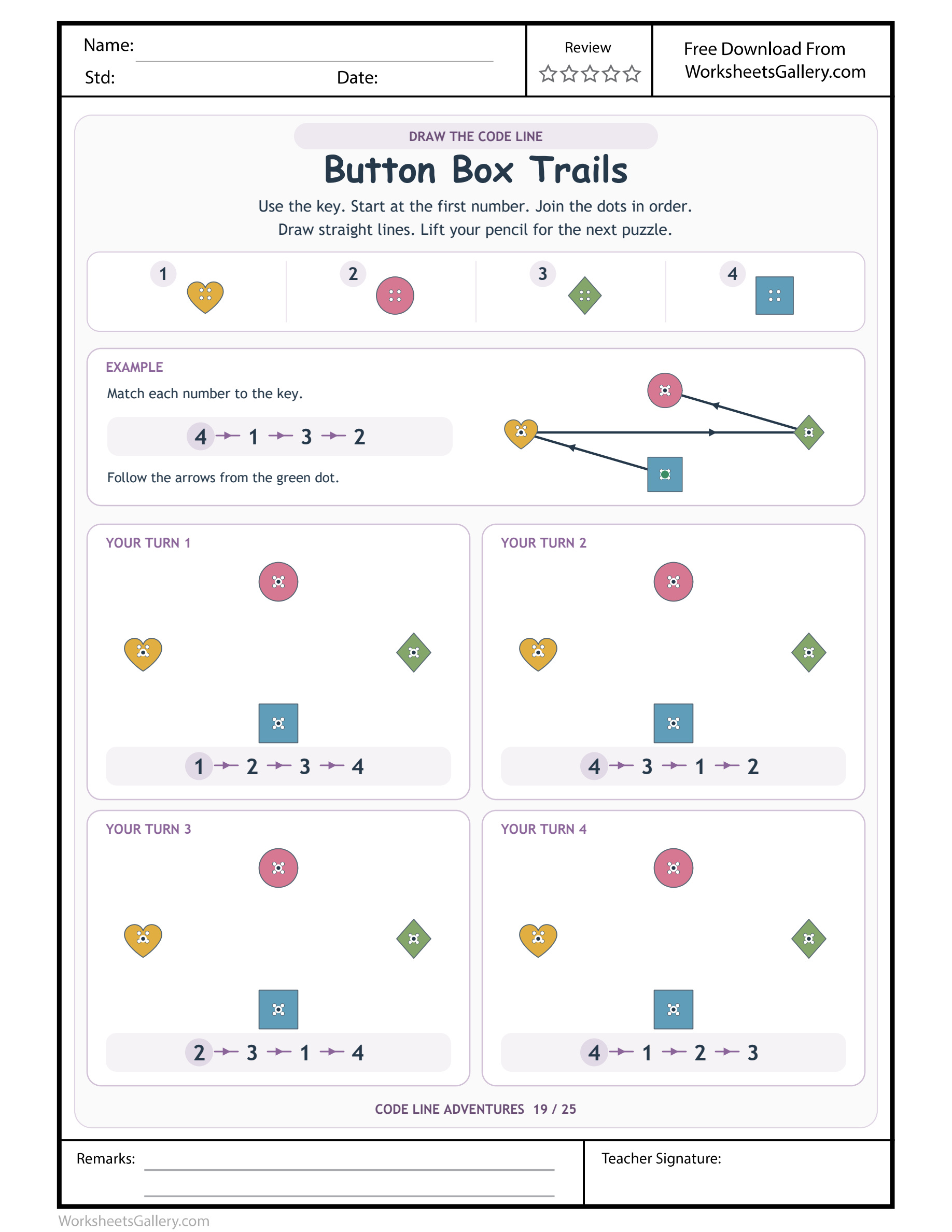
Four buttons meet a larger collection priced at $3. This compact four-entry key stays unchanged in the clean 25-page PDF, accompanied by the other object, colour and texture route worksheets.
Four buttons can produce several different journeys without adding another shape. Button Key Connections uses a heart, circle, diamond and square as a compact number key, then supplies four separate practice routes through the same pictured field. Children translate each code and connect the corresponding centre dots in order. A wide example demonstrates one arrangement of visits, while the independent strips request others. The small symbol set makes comparison approachable: all four buttons can appear in a route, yet the start, the middle connections and the endpoint still depend on the particular instruction being followed.
Same four destinations, different itineraries — Button Key Connections
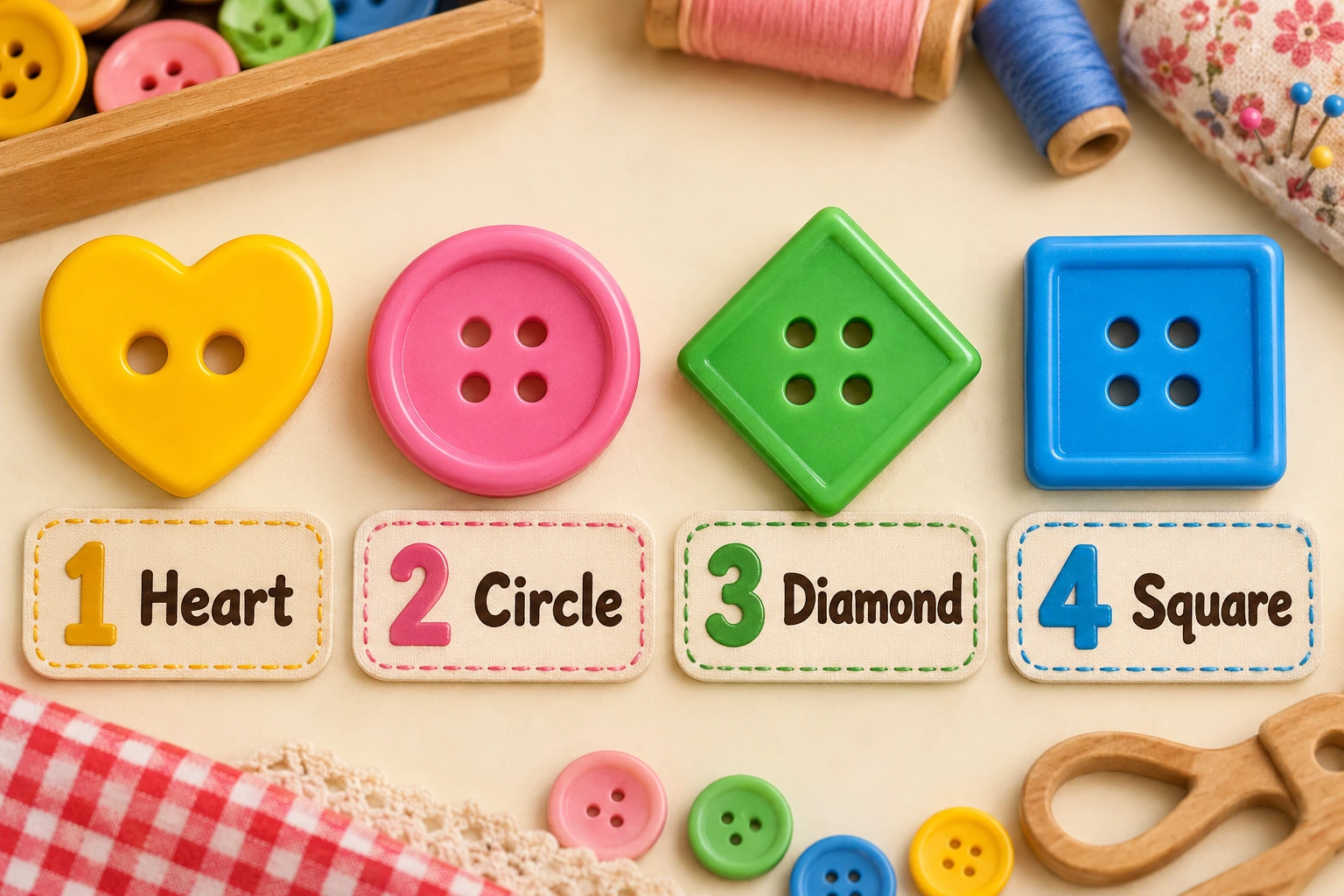
In Button Key Connections, one identifies heart, two circle, three diamond and four square. Every practice strip uses those four entries once, but the orders differ. A child who joins all four shapes without inspecting the sequence may visit the right set and still draw the wrong route.
The first Button Key Connections practice instruction counts upward, while the others rearrange the entries. Compare their starts before drawing. Including every button does not decide which comes next. Four visited centres also create three connecting segments, with no extra return to the starting button requested.
Button Key Connections legend at a glance
| Button Box Trails numeral | Keyed picture |
|---|---|
| 1 | heart button |
| 2 | round button |
| 3 | diamond button |
| 4 | square button |

Button Box Trails example before independent drawing
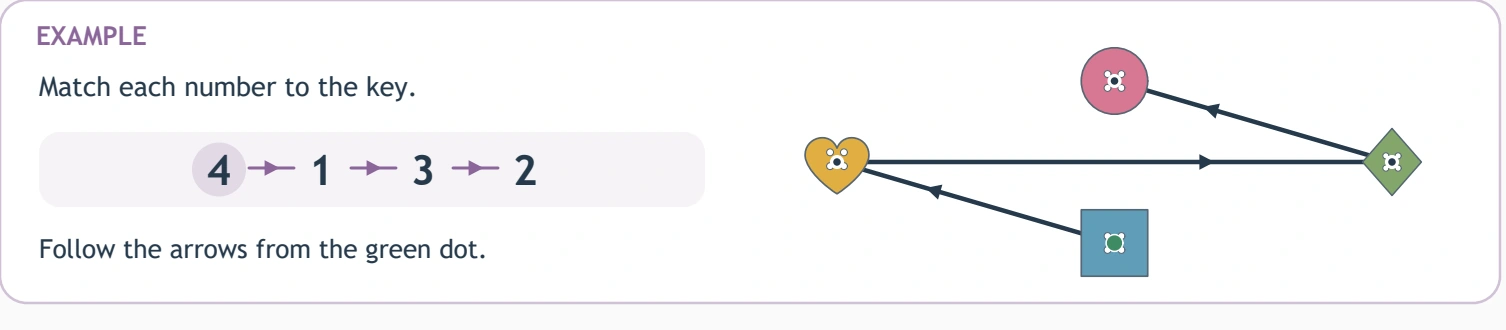
Button Box Trails demonstrates 4 → 1 → 3 → 2. The Button Box Trails itinerary is square button → heart button → diamond button → round button. In Button Box Trails, the green start selects square button. Button Box Trails arrows lead to round button. Button Box Trails has 3 worked segments. The Button Key Connections example supports finger rehearsal. Inspect the Button Box Trails practice strip separately.
Button Box Trails — practice 1
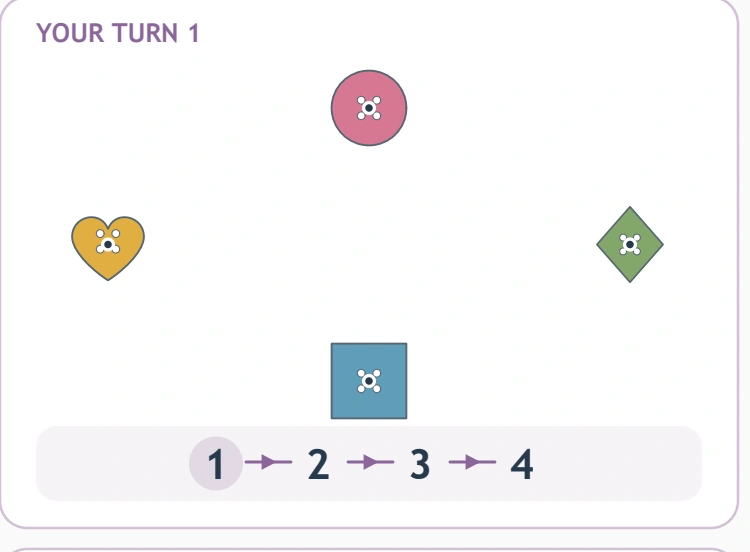
Practice 1 on Button Box Trails: 1 → 2 → 3 → 4. Translate those Button Key Connections destinations as heart button → round button → diamond button → square button. Begin on heart button for Button Box Trails; next locate round button. The Button Box Trails centre-to-centre connections are heart button then round button; round button then diamond button; diamond button then square button. Segment count for Button Key Connections: 3, from 4 listed stops. The Button Box Trails endpoint is square button. Against the Button Box Trails strip, verify final 4.
Button Box Trails uses every Button Key Connections entry in practice 1 of Button Box Trails: 1 → 2 → 3 → 4. First Button Box Trails selection: heart button; final selection: square button.
Button Box Trails — practice 2
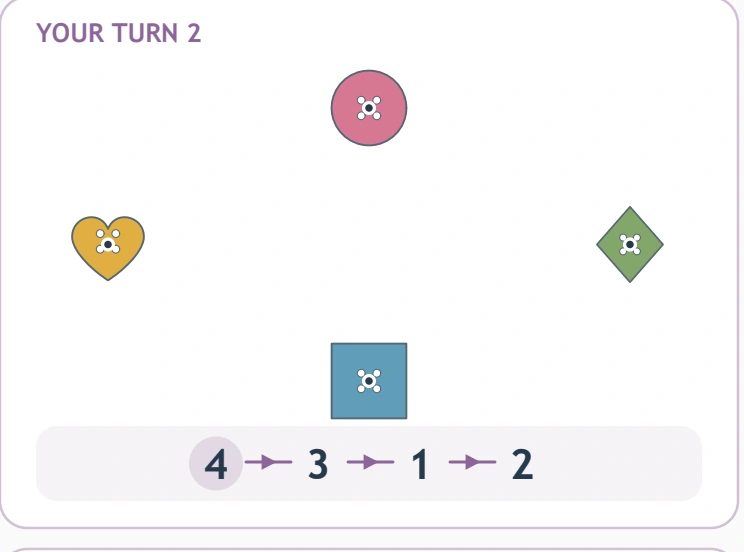
Practice 2 on Button Box Trails: 4 → 3 → 1 → 2. Translate those Button Key Connections destinations as square button → diamond button → heart button → round button. Begin on square button for Button Box Trails; next locate diamond button. The Button Box Trails centre-to-centre connections are square button then diamond button; diamond button then heart button; heart button then round button. Segment count for Button Key Connections: 3, from 4 listed stops. The Button Box Trails endpoint is round button. Against the Button Box Trails strip, verify final 2.
Button Box Trails uses every Button Key Connections entry in practice 2 of Button Box Trails: 4 → 3 → 1 → 2. First Button Box Trails selection: square button; final selection: round button.
Button Box Trails — practice 3
Practice 3 on Button Box Trails: 2 → 3 → 1 → 4. Translate those Button Key Connections destinations as round button → diamond button → heart button → square button. Begin on round button for Button Box Trails; next locate diamond button. The Button Box Trails centre-to-centre connections are round button then diamond button; diamond button then heart button; heart button then square button. Segment count for Button Key Connections: 3, from 4 listed stops. The Button Box Trails endpoint is square button. Against the Button Box Trails strip, verify final 4.
Button Box Trails uses every Button Key Connections entry in practice 3 of Button Box Trails: 2 → 3 → 1 → 4. First Button Box Trails selection: round button; final selection: square button.
Button Box Trails — practice 4
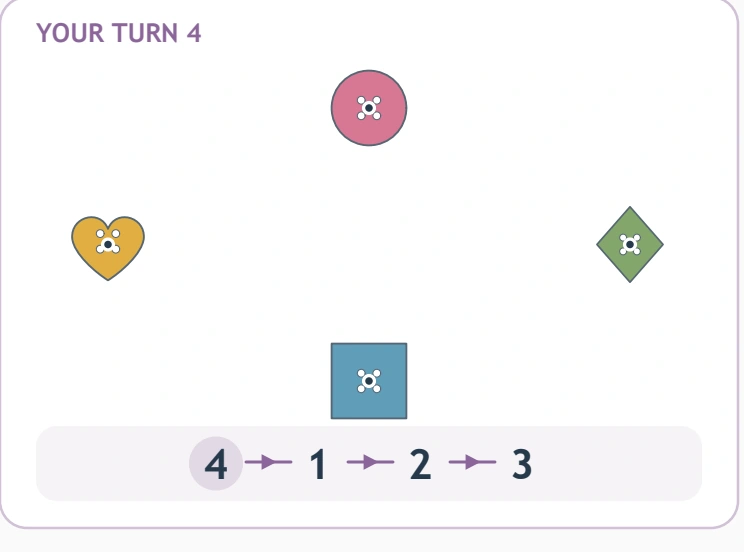
Practice 4 on Button Box Trails: 4 → 1 → 2 → 3. Translate those Button Key Connections destinations as square button → heart button → round button → diamond button. Begin on square button for Button Box Trails; next locate heart button. The Button Box Trails centre-to-centre connections are square button then heart button; heart button then round button; round button then diamond button. Segment count for Button Key Connections: 3, from 4 listed stops. The Button Box Trails endpoint is diamond button. Against the Button Box Trails strip, verify final 3.
Button Box Trails uses every Button Key Connections entry in practice 4 of Button Box Trails: 4 → 1 → 2 → 3. First Button Box Trails selection: square button; final selection: diamond button.
Tia's imagined button-box conversation
Imagine Tia examining Button Key Connections with a caregiver. She says she has finished because every button is connected. They inspect the first two numerals in the current strip and compare that pair with her first line. Tia sees that the right shapes can be connected in a different order.
They finger-rehearse the requested Button Key Connections itinerary, then repair the mismatched pair rather than adding more lines. The caregiver praises Tia's comparison, not the number of marks on the page. They save another route for a later visit, keeping the compact button set familiar without making the whole sheet compulsory.
Six useful observations from four symbols
- Set and order differ. Button Key Connections keeps the button identities constant while changing their itinerary. A child can see that visiting the same four pictures does not make every journey equivalent.
- A key remains useful. The Button Key Connections legend supplies each button's numeral whenever uncertainty arises. Checking that visible assignment is a practical strategy rather than evidence that every Button Box Trails assignment should already be remembered.
- Names describe a choice. During Button Key Connections, heart or square can clarify an instruction for another person. A child may point or use familiar words while the adult supplies a more precise shape name.
- Centres guide the hand. Each Button Key Connections target invites a deliberate straight stroke. Looking toward the next dot before moving can support a controlled arrival, with comfort valued above perfectly ruled lines.
- A pair supports checking. Compare one Button Key Connections segment with adjacent code entries. This keeps review manageable and gives a clear location for a correction when the itinerary and drawing disagree.
- A final stop permits restraint. The Button Key Connections code ends after its fourth visit. Stopping there, without closing a loop, demonstrates attention to the instruction rather than a need to make a visually complete border.
Readiness for a compact route field
Children approximately four to seven can explore Button Key Connections with support matched to numeral recognition and pencil comfort. The small key may be useful when a larger symbol set feels demanding, but it is not a guarantee of ease. Interpreting the order still requires attention, even when all four shapes are familiar.
Set Button Key Connections flat and keep the legend accessible. Follow the sample arrows with a finger, select one practice panel and locate its first pair. Draw that connection, inspect the next numeral and continue. Lift between fields, and stop after a short route if the hand or attention needs a rest.
A classroom comparison desk, imagined
Picture a teacher asking two children to finger-follow different Button Key Connections strips on their own copies. They name the same four buttons but start and finish in different places. The teacher asks them to identify one connection that changed, making the order comparison visible.
Children then draw a chosen Button Key Connections route individually. The teacher observes whether a wrong path came from a legend mismatch or from rearranging the visits. She supplies a specific clue for that need. A short explanation of one changed pair can be the session's success, without a race through all four panels.
Four button games on separate materials
Compare two spoken orders
After Button Key Connections, arrange large labelled shape cards and name two short itineraries using the same cards differently. Let a toy follow each. Discuss how a shared set of destinations can produce different journeys when their order changes.
Give a shape a helpful clue
Describe one Button Key Connections button using its outline rather than colour. A partner finds the key entry and checks its numeral. Add a second clue if the description is unclear, treating better communication as a shared task rather than blaming the listener.
Count visits and movements separately
Finger-follow a Button Key Connections route and count each visited button, then count the movements between them. Compare four visits with three links using the visible path. Keep the exchange optional and concrete; the sheet does not require written arithmetic answers.
Let a puppet close the journey unnecessarily
A puppet adds a return to the first Button Key Connections button after reading the last numeral. The child checks whether the strip requests that visit. The puppet can stop at the actual endpoint, giving restraint a friendly role in the pretend game.
Encourage a careful comparison, not more marks
Typical Button Key Connections mistakes include assuming every route counts upward, joining all four buttons in any order or outlining their edges. Inspect the current strip and the little centre targets. If a child has selected the correct itinerary but drawn unevenly, recognise the lookup success before discussing movement.
Repeat Button Key Connections in brief invitations around shape play or a story. Invite the child to choose a Button Box Trails field and ask for numeral help. Noticing a changed connection is an achievement. A comfortable pause and specific encouragement can make returning to a partly completed button page feel worthwhile.
Print a four-button itinerary
The original Button Key Connections sheet is available as a sample. Eligible active members can sign in to download its cleaned premium PDF, with the Button Box Trails watermark and domain removed, and no printable-page advertisements. A separate $3 purchase provides the complete collection of twenty-five supplied themes.
Save Button Key Connections, review portrait print preview and preserve all key entries and the full outer frame. A clear colour print supports the button distinctions. Check one test copy and adjust fitting if the printer trims an edge before preparing additional pages.
Other tasks that depend on the stated rule
Compare Button Key Connections with Castle Color Codes. After Button Box Trails, try Number Letter Switching. For Button Box Trails, consider Exact Path Detective.
For shared play around Button Key Connections, adults may use NAEYC's family education resources and PBS Parents' play-and-learning ideas as optional inspiration. The button worksheet's own four-entry legend remains the reference for its requested drawing order.
Popular Worksheets
Printable resources families and teachers are downloading now.
 Free
 Free
 Free
 Free