
Castle Color Codes: 4 Amazing Number-Color Rules
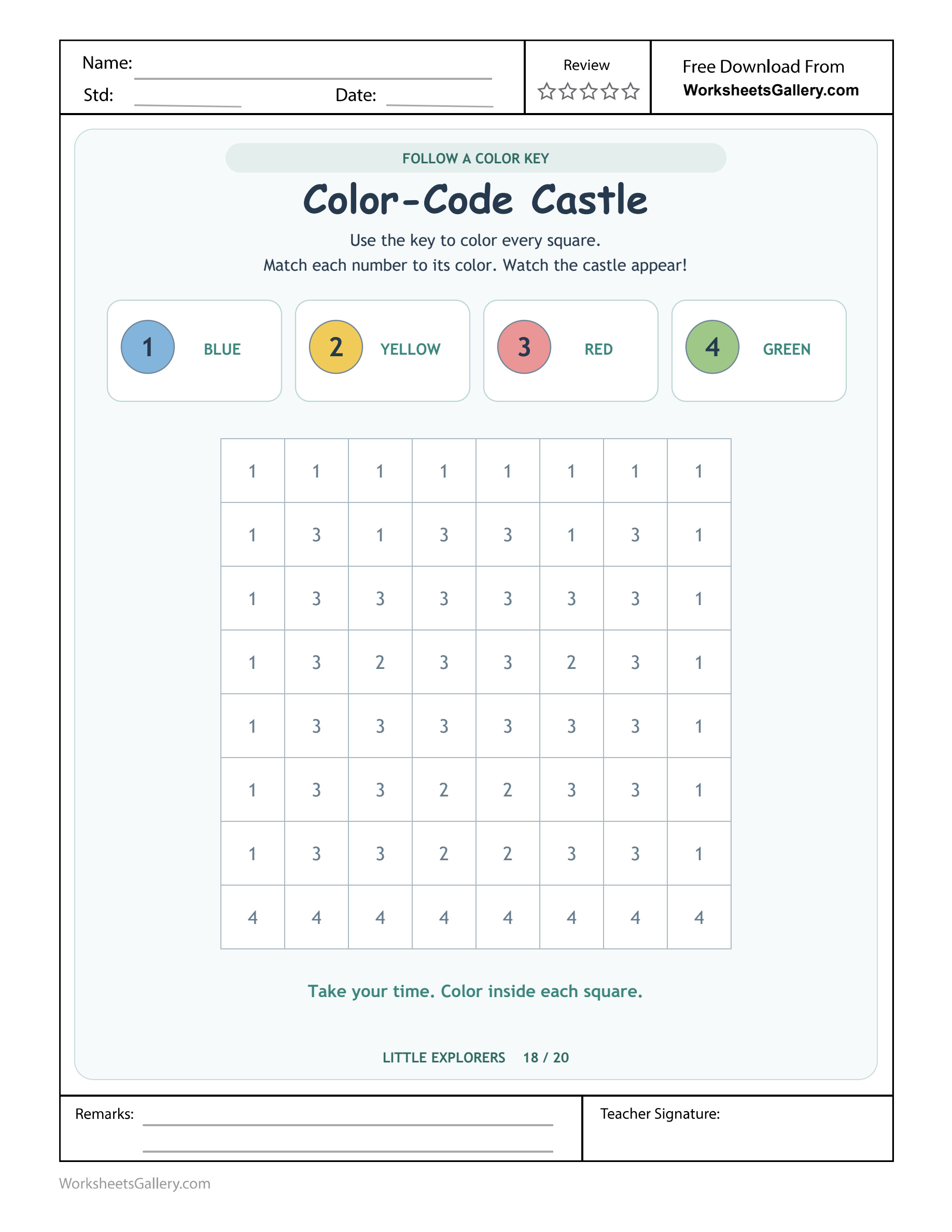
$5 collection companion: Castle Color Codes. Consult a four-entry key while filling an eight-by-eight numbered castle mosaic.
A numbered grid becomes a castle picture when each square follows the printed colour key. Castle Color Codes links 1 with blue, 2 with yellow, 3 with red and 4 with green across an eight-by-eight mosaic. Children consult those four associations as they colour, rather than choosing a new palette for each area. The top row, castle details and ground provide different places to check the same rule. Start with the key, prepare the four colours and let the learner decide how to work through the grid.
Prepare the legend before entering the grid — Castle Color Codes
Place blue, yellow, red and green colouring tools beside Castle Color Codes. Read each key entry with Theo and point to the matching tool. The printed numeral tells the learner which colour to use, so a familiar castle colour scheme should not replace the actual instructions.
An adult can read the colour words aloud while Theo matches the tools. Independent word reading is not required to discuss the association. Before colouring a square, he can point to its numeral, find the corresponding key entry and choose the tool that the entry specifies.

Four associations govern all sixty-four squares
| Printed numeral | Colour required | A place to inspect |
|---|---|---|
| 1 | Blue | The complete upper row and surrounding areas |
| 2 | Yellow | Selected window and door details |
| 3 | Red | The main castle shape |
| 4 | Green | The bottom row |
The Castle Color Codes key is consistent throughout the sheet. A numeral does not gain a different colour because it appears beside another architectural feature. The resulting design is a blue surround, a red castle with yellow details and a green base.
A square's number is an instruction, not an amount to add: Castle Color Codes
The task does not ask Theo to total the numerals or colour only that many squares. Every cell has its own code entry. A square marked 3 is coloured red because of the legend, not because the child needs to locate three red squares in that row.
Choose a route that keeps checking possible: Castle Color Codes
Theo might work across a row, down a column or through all squares carrying one numeral. Any of those approaches can fit Castle Color Codes if every square is checked against the same key. Ask him which route will help him notice places still waiting for colour.
Working with one colour at a time can reduce tool changes, but it may require a careful scan to find every matching numeral. Working row by row keeps the next cell easy to locate while changing colours more often. Discuss the practical trade-off through the child's own experience rather than prescribing one universal method.
Colour slowly enough to preserve the cell boundaries: Castle Color Codes
The grid lines separate neighbouring instructions. A dark sweep across several squares can make their numerals harder to inspect. Encourage a pace and tool pressure that let Theo see which cell he is answering. Developing colouring control may need support even when the code choice is correct.
A home key check before the castle appears: Castle Color Codes
Imagine Theo and his mother preparing four colour cards beside the page. Theo finds a 2 in the grid, checks the yellow key entry and chooses his yellow crayon. His mother asks how he knew, allowing him to demonstrate the reference rather than simply confirm a colour name.
Later he reaches a neighbouring 3. Because he has just used yellow, he nearly continues with the same tool. A glance back at the numeral changes his plan to red. This small pause makes the code the reason for the colour change.
They stop after part of Castle Color Codes is complete and leave the four tools together for another visit. The unfinished squares retain their printed numerals, so the next session can begin with a fresh key check. There is no need to reconstruct a forgotten free-choice palette.
Six observations inside a coded colouring task: Castle Color Codes
Recognising repeated numerals
The same four symbols appear in many locations. Notice whether Theo recognises a numeral when it moves to a new part of the picture. The grid offers repeated encounters without changing the key's meaning.
Consulting a reference independently: Castle Color Codes
Castle Color Codes keeps its legend visible above the mosaic. A child can return to it whenever an association is uncertain. Looking again is a useful strategy, not evidence that the activity should already have been memorised.
Maintaining a rule across different regions: Castle Color Codes
A 1 stays blue at the top, beside the castle and near its details. Ask whether the code changes when a square seems to belong to another feature. This can reveal whether the learner is following the numeral or colouring from a guessed picture.
Planning a manageable scan: Castle Color Codes
Row order and colour order make different demands on attention. Theo can describe where he will look next and how he will spot a missed cell. The plan can change if his first route becomes difficult to track.
Coordinating the selected colour with a small space: Castle Color Codes
Choosing red and placing it within one cell are separate actions. A child may know the association while needing a larger grip or more time for control. Castle Color Codes gives an adult a reason to observe both without confusing them.
Auditing a finished section
Before moving on, Theo can compare a few coloured cells with their visible numerals and the legend. This small audit can catch a tool carried over from the previous square. It is easier to discuss a specific mismatch than to judge the whole picture as right or wrong.
A classroom code reader and colour finder: Castle Color Codes
In a hypothetical paired activity, one child points to a grid numeral while the other finds its entry in the legend. They name the required colour before each learner returns to their own sheet. Swap the roles so both have a reason to consult the reference.
The teacher can ask what would happen if every 2 were made green. Learners can point to the key to explain why that would not follow this source's instruction. The conversation concerns the agreed code, rather than whether green would look attractive in a different castle drawing.
For children who want more independence, invite a plan for one row or one numeral group, then ask for a brief check at the end of that section. Castle Color Codes contains sixty-four cells, so dividing it into manageable portions can make the process clearer than asking everyone to finish the whole mosaic together.
Look closely at the lower picture details: Castle Color Codes
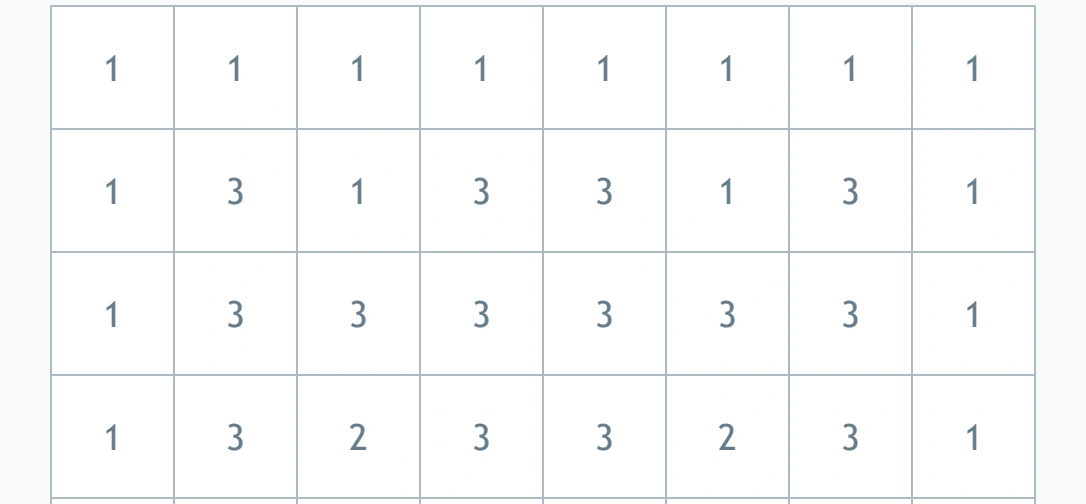
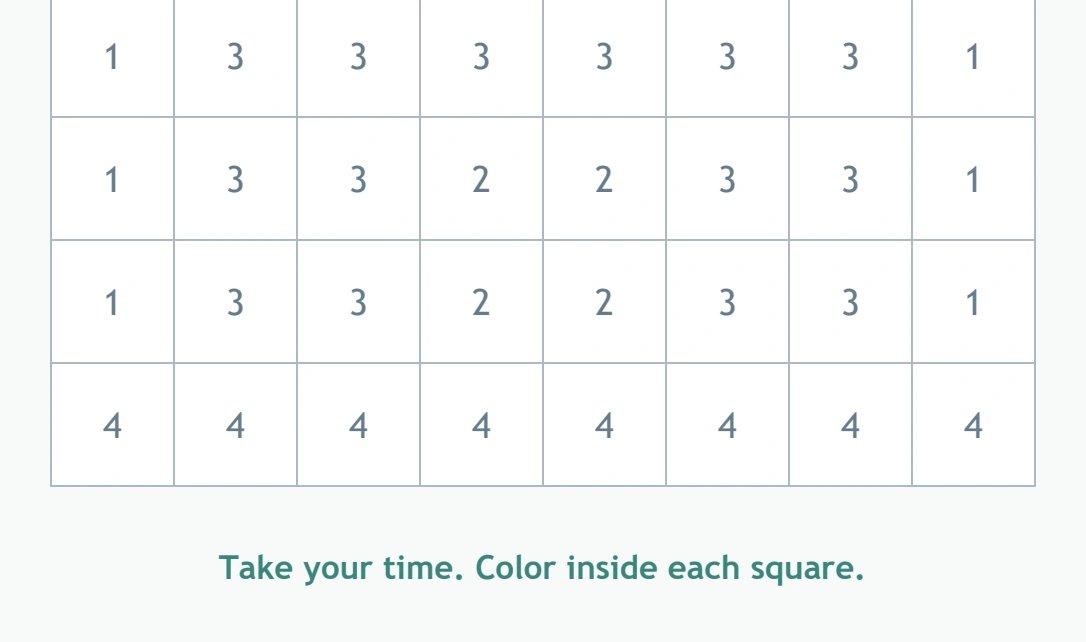
The lower grid contains yellow door-area squares within the red shape, followed by the green base. A colouring sweep guided only by the imagined outline of a castle may miss those smaller changes. Read each printed numeral even when the surrounding region appears uniform.
The full bottom row uses 4. That repeated code offers a useful place to verify the green association, but the source still asks for each cell to be coloured. Theo can describe the repeated pattern after checking it, rather than assuming the whole lower section must share a colour before looking.
Five code activities beyond the printed castle: Castle Color Codes
Match four tool cards
Prepare cards with the same numeral-colour associations and invite Theo to place each beside its tool. Shuffle their positions while keeping their meanings fixed. This separates the code itself from a remembered left-to-right arrangement of crayons.
Read a three-square message
On spare paper, write a short row such as 1, 3, 2 and use the source key to colour it. Ask how the child found each colour. Make clear that this is a new little code strip, separate from the original castle grid.
Find the deliberate mismatch: Castle Color Codes
An adult colours a spare square labelled 4 in red. Theo checks it against the legend and explains what needs to change. The example should be easy to inspect, giving the learner a meaningful checking role.
Invent a different code on a new sheet: Castle Color Codes
Once the original activity is understood, let Theo create a separate legend for a fresh drawing. The new key belongs to that extension only. Compare how an agreed legend makes the instructions understandable to someone else.
Explain a route through a mosaic: Castle Color Codes
Use a small drawn grid and ask the child to describe where to begin and where to look next. Another person follows that route with a finger. This turns scanning into a plan that can be communicated before any colouring starts.
Keep illustration and answer reference distinct: Castle Color Codes
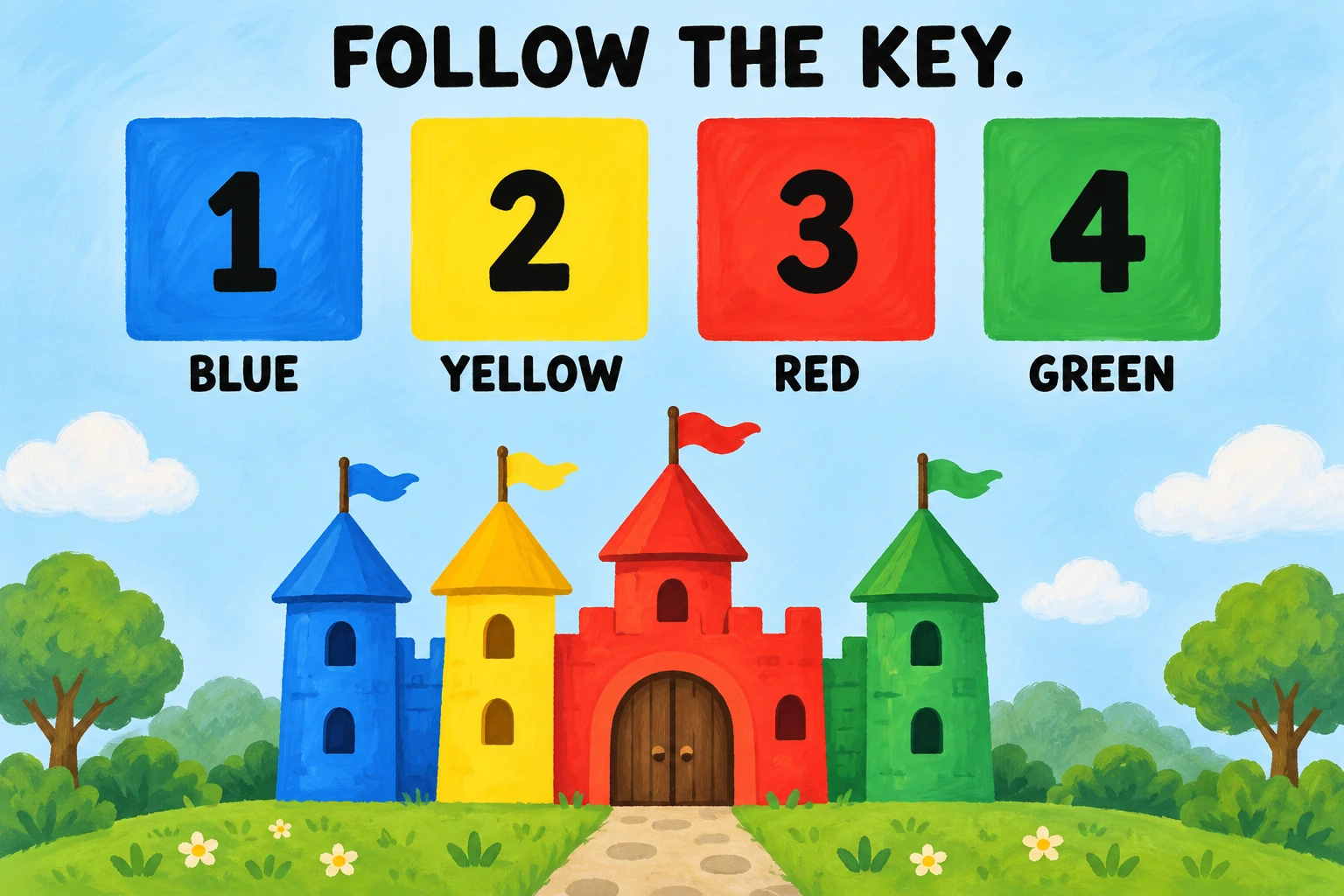
The supporting scene shows a child working with a decorative castle and a visible colour legend. It illustrates the idea of checking a code. For the actual Castle Color Codes response, use the numerals and key on the full worksheet preview as the authority for every cell.
Common difficulties include using a favourite colour regardless of the numeral, carrying a crayon into the next differently coded square, missing isolated cells or confusing a numeral with a quantity request. Return to one cell and its matching legend entry. A specific code-reading demonstration is more useful than asking the child to make the whole page neater.
Adjust the amount, while retaining the key
Adult-supported exploration suits many children around four to six. An adult may read the colour words, help identify tools or suggest a shorter section for the first visit. Keep Theo involved in making the numeral-to-colour decision even when someone helps organise the materials.
For a return session, begin by reviewing the four associations and finding one unfinished square. The goal can be a clear explanation of a small section. Repeated brief practice is useful when it gives the child time to plan, act and check, rather than simply complete more cells automatically.
Download the complete coded grid: Castle Color Codes
An eligible active membership provides the premium Castle Color Codes single-sheet PDF. The clean copy removes website watermark and domain promotion and includes no embedded advertisements. The original source remains separately available as a sample file.
Inspect the portrait print preview for the complete legend, all eight columns and the entire green-base row. A missing edge would remove part of the coded picture. This activity also appears in the related $5 Little Explorers clean twenty-page collection, available as a separate bundle purchase.
Explore another kind of rule after colouring: Castle Color Codes
After Castle Color Codes, explore Acorn Colour Matching beside Castle Color Codes, Cupcake Colour Puzzle after Castle Color Codes, Robot Grid Repair beyond Castle Color Codes. Keep each new instruction separate from Castle Color Codes.
For further discussion-led activities, explore PBS Parents' learning ideas for four-year-olds and their families. NAEYC's advice on meaningful marks and writing at home can support a child's explanation of their work. In Castle Color Codes, connect the printed numeral, the shared colour legend and the particular square being filled.
Popular Worksheets
Printable resources families and teachers are downloading now.
 Free
Free
 Free
Free
 Free
Free
 Free
Free