
Fruit Search Totals: 4 Fresh Count-and-Check Challenges
Give the fruit search some new puzzle neighbours. The full supplied selection is available as a $5 clean download of 25 pages. After sorting targets from distractors here, choose a matching sheet or another challenge from the same printable file.
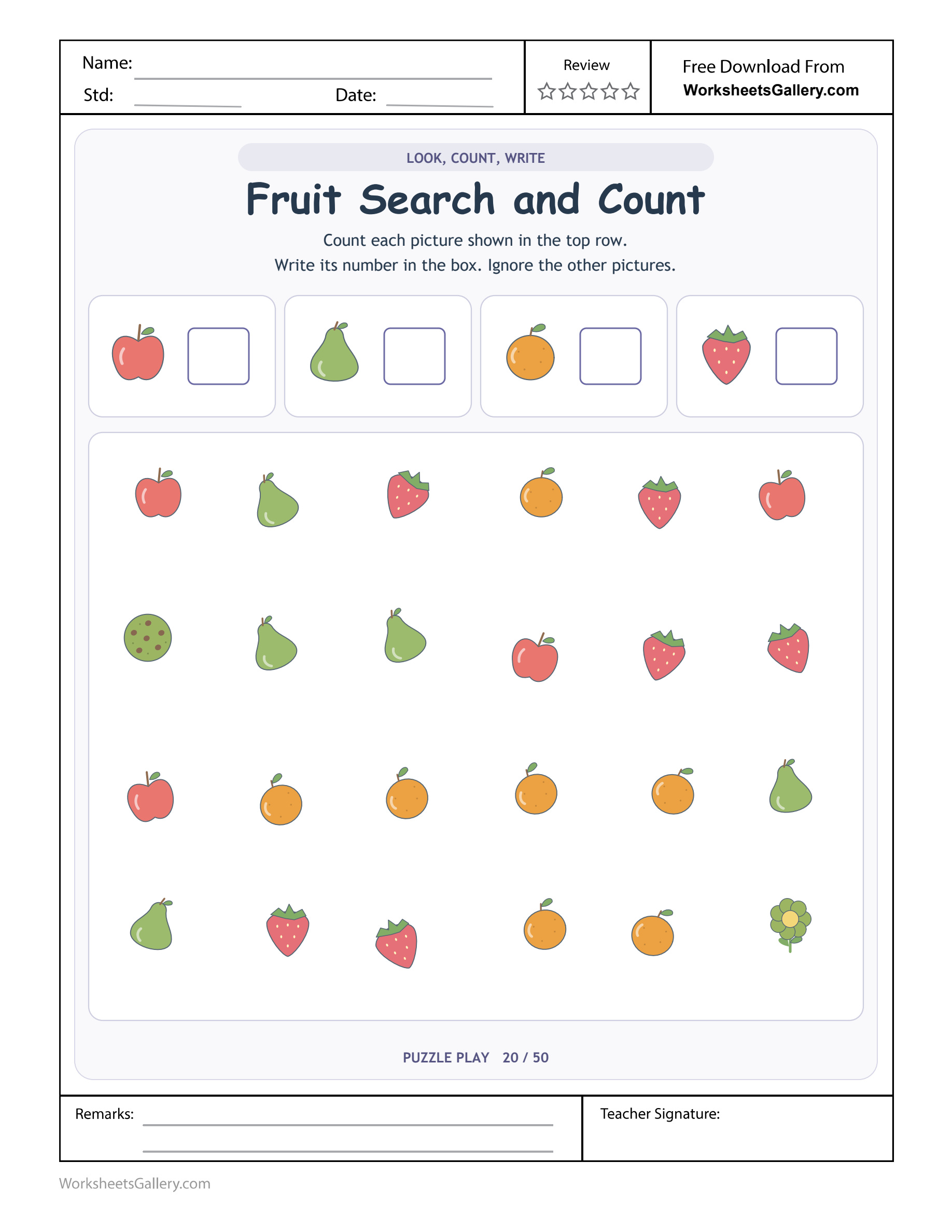
The cookie is colourful and interesting, but it cannot increase an orange total. Fruit Search Totals asks children to filter four fruit identities from a mixed picture field and record each quantity in its own box. Apples, pears, oranges and strawberries share the search area with two distractors, while the top reference pictures explain the answer slots. Name the current fruit, follow a consistent inspection order and say its name with the total before writing. That final identity check can prevent good counting from reaching the wrong box.
Fruit Search Totals: the rule on this particular sheet
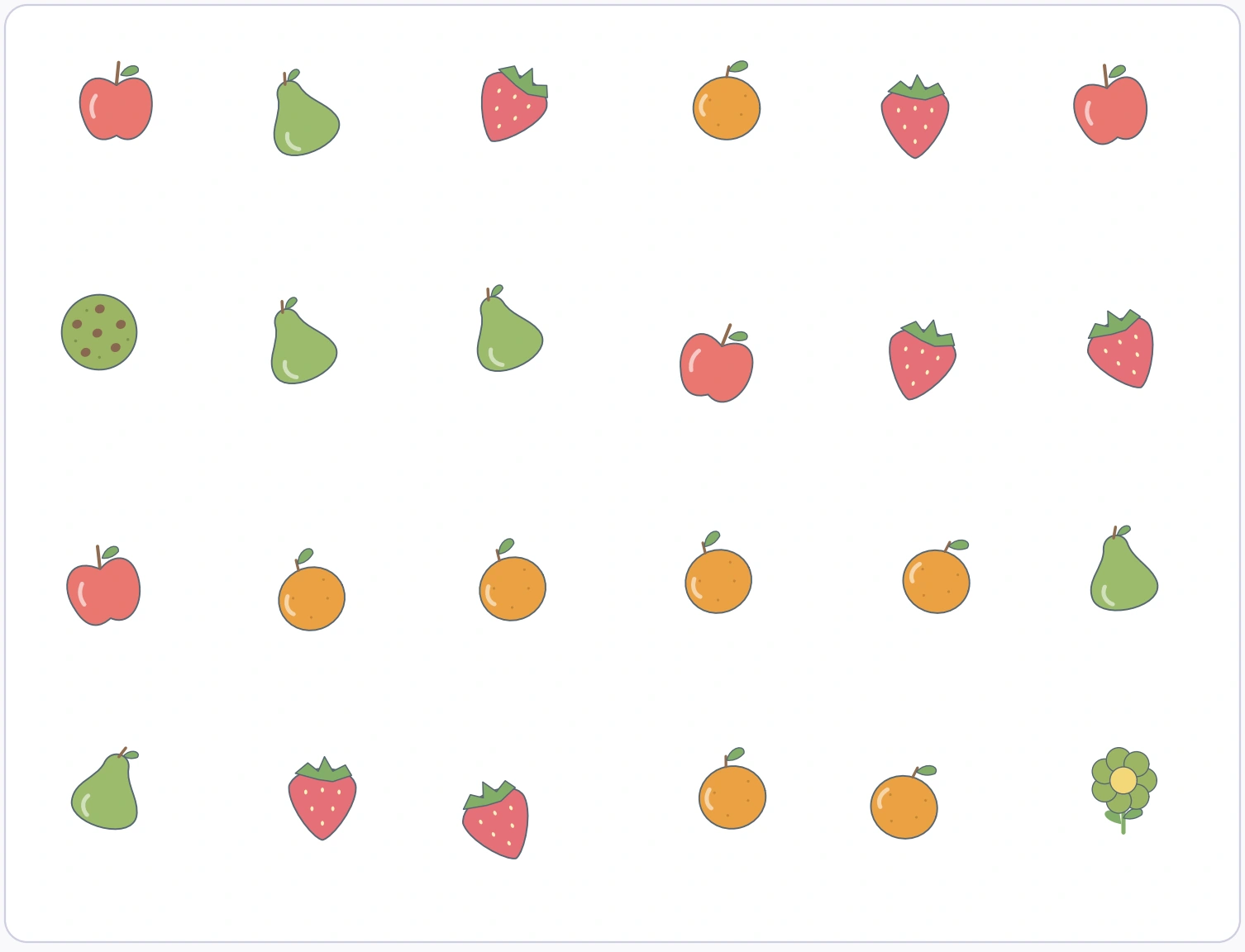
The reference row identifies apple, pear, orange and strawberry. Count each requested fruit in the large twenty-four-picture field, then write its numeral beside the corresponding reference image.
The adult totals are four apples, five pears, seven oranges and six strawberries. Cookie and flower pictures are distractors, so the requested fruit counts total twenty-two rather than all twenty-four field objects.

What orange box reveals
Filtering comes before comparison. Decide which fruit is being counted, inspect the field in an organised order and ignore other identities until that category is finished. Switching categories halfway through can make a total hard to reconstruct.
The reference pictures above the field show what each answer box represents. Do not include them as another apple, pear, orange or strawberry. They remain useful guides while the actual counted collection stays inside the lower field.
Name the fruit with its total
A bare number can lose its meaning when the child moves from the field to the reference row. Say four apples or seven oranges before locating the appropriate box. That small language link can protect accurate counting from a recording error. If the numeral lands beside another fruit, inspect the destination before assuming that the original category count must be repeated from scratch.
Imagine Arlo at a home puzzle table
Arlo spots a cookie and asks whether it counts as a treat. His uncle agrees that it could in another activity, then points to the four fruit targets. The current rule asks for fruit identities, so the cookie remains outside those totals. Here, Fruit Search Totals gives Arlo a reason to discuss relevant-object filtering using the Fruit Search and Count clues.
A practical Fruit Search Totals sequence
Apple box with Arlo
Begin Fruit Search Totals: apple box. Record 4 apples from the main field. Ask Arlo, “Does this picture match our selected fruit?” The uncle and Arlo can inspect apple box together.
Pear box with Arlo
Next inspect Fruit Search Totals: pear box. Record 5 pears after a separate category scan. Ask Arlo, “Which fruit are we counting until this pass ends?” The uncle and Arlo can inspect pear box together.
Orange box with Arlo
Then confirm Fruit Search Totals: orange box. The orange total is 7, excluding its key picture. Ask Arlo, “Where should the orange total go?” The uncle and Arlo can inspect orange box together.
Strawberry box with Arlo
Finally record Fruit Search Totals: strawberry box. There are 6 strawberries inside the counted field. Ask Arlo, “Why are we leaving this picture out?” The uncle and Arlo can inspect strawberry box together.
Fruit Search Totals adult reference
| Printed clue | Source check |
|---|---|
| Apple box | Record 4 apples from the main field. |
| Pear box | Record 5 pears after a separate category scan. |
| Orange box | The orange total is 7, excluding its key picture. |
| Strawberry box | There are 6 strawberries inside the counted field. |
A distractor can fit another sensible game
The cookie could belong in a treat collection and the flower in a garden group. Acknowledge those possibilities while keeping the current four fruit targets clear. This helps explain exclusion without making a broad claim that the picture is wrong to be on the page. The relevant question is whether it belongs in the category being counted during this particular pass.
5 observations in Fruit Search Totals
Relevant-object filtering: Does this picture match our selected fruit
Here, the current fruit category controls what receives a count. The prompt “Does this picture match our selected fruit?” gives Arlo a way to explain relevant-object filtering to the uncle.
Counting consistency: Which fruit are we counting until this pass ends
In Fruit Search Totals, one category is followed through the full field. The prompt “Which fruit are we counting until this pass ends?” gives Arlo a way to explain counting consistency to the uncle.
Numeral-to-key matching: Where should the orange total go
In Fruit Search Totals, the answer box is identified by its reference image. The prompt “Where should the orange total go?” gives Arlo a way to explain numeral-to-key matching to the uncle.
Distractor reasoning: Why are we leaving this picture out
In Fruit Search Totals, cookie and flower do not enter a fruit-category total. The prompt “Why are we leaving this picture out?” gives Arlo a way to explain distractor reasoning to the uncle.
Quantity comparison: Which requested fruit appears most often
In Fruit Search Totals, four recorded totals can be discussed after verification. The prompt “Which requested fruit appears most often?” gives Arlo a way to explain quantity comparison to the uncle.
Fruit Search Totals: orange box mistakes
Counting every colourful object produces a field total but fails the four separate fruit questions. Another slip is writing the correct number in the wrong reference box. Name the target again immediately before recording its numeral. Invite Arlo to discuss orange box with the uncle.
Different arrangements need consistent tracking
The fruits are mixed rather than grouped into four neat piles. For Fruit Search Totals, A row-by-row sweep lets the child keep the selected identity stable while moving through that mixture. Pointing can mark the current position temporarily without colouring every printed object. An adult can help re-establish the row after an interruption, leaving the identification and counting words to the child.
Five play invitations after Fruit Search Totals
Set up a tiny fruit stall
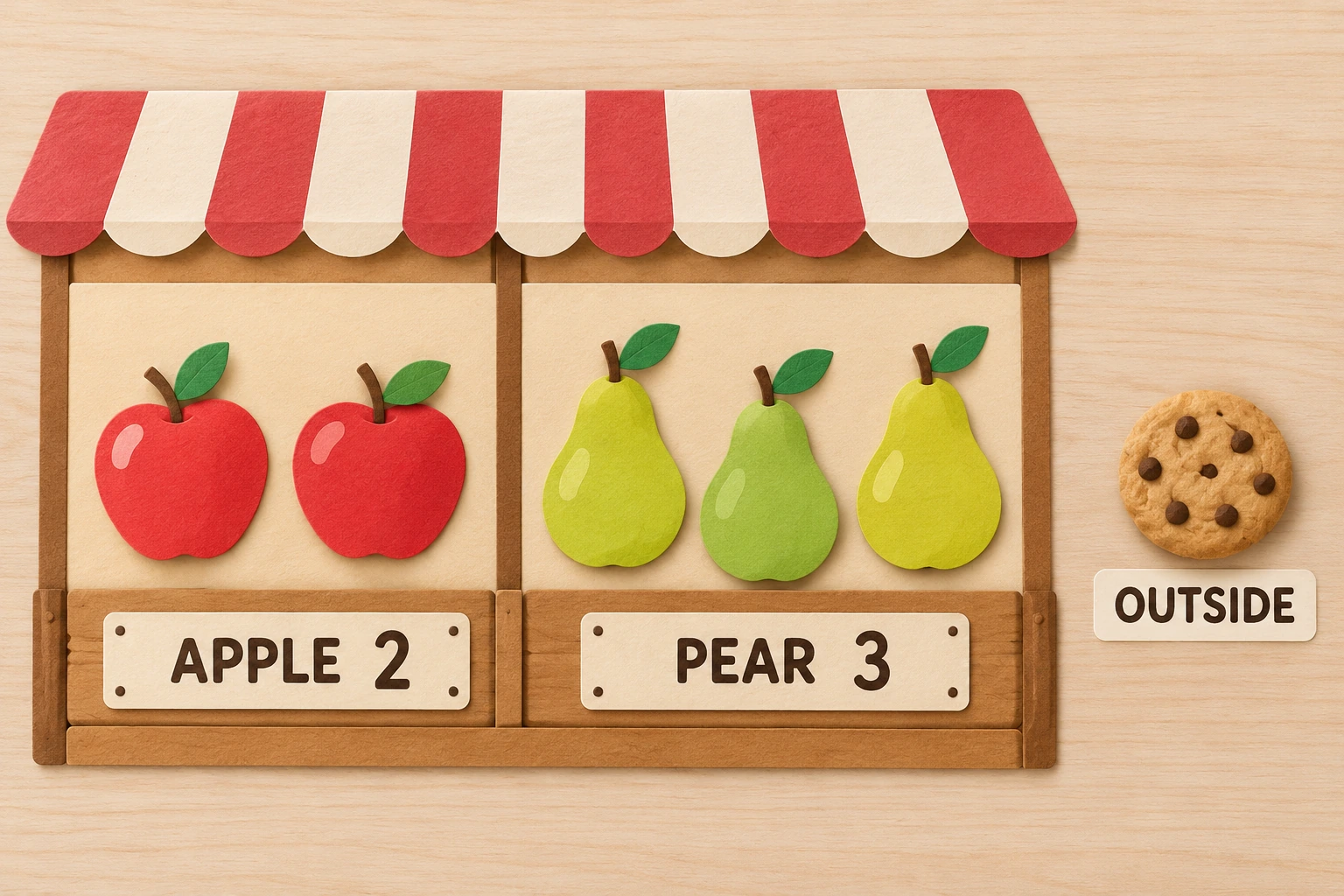
Arrange two apples and three pears with completed labels APPLE 2 and PEAR 3. Keep a cookie outside the mat and explain which objects each number describes. After this Fruit Search Totals play round, ask the uncle which clue Arlo chose to explain.
Give one fruit a counting turn
Place several fruit pictures in mixed rows. A customer requests a pear total only, so the counter names pears while deliberately passing apples without adding to that count. Let Arlo demonstrate this example before another Fruit Search Totals visit; ask the uncle to listen for Arlo’s reasoning.
Deliver a numeral to its fruit
Write a verified total on a loose number card and invite the child to deliver the numeral to its matching fruit key. The delivery tests recording after the quantity has already been checked. On a later Fruit Search Totals visit, ask Arlo what changed; the uncle can discuss Arlo’s evidence.
Ask the cookie for its rule
Invent a playful cookie voice asking to join the count. The child explains why a cookie could belong in a treat game but not in the present apple total. Ask Arlo how this example relates to Fruit Search Totals; the uncle can follow the clue that Arlo identifies.
Compare checked market totals
Count two small fruit groups independently, then discuss which is larger. Avoid comparing before both totals have visible counting evidence. Keep Arlo’s own explanation central in this Fruit Search Totals game. Let the uncle hear what Arlo observed.
Classroom partners inspect pear box
A teacher asks a pair to count oranges first and explain how they ignored the flower and cookie. Another pair checks pears. The class compares methods for keeping a place, rather than assuming a busy field must be counted all at once. For a Fruit Search Totals partner visit, counting consistency is this fruit search totals partnership focus.
Compare only after the records are checked
Once the four quantities have been verified, discuss which requested fruit appears most often or least often. These questions extend the recorded information rather than replace the original counting. If an answer seems surprising, return to the corresponding category scan. The printed field remains available as evidence, so comparison need not depend on trusting an unchecked numeral simply because it has already been written.
Readiness for Fruit Search Totals at ages 4–6
Name the target fruit before each scan and accept a spoken total if writing the numeral is difficult. A loose pointer can help follow the field without colouring or altering its printed objects. Suggested range for Fruit Search Totals: ages 4–6. Begin with relevant-object filtering and adult support.
For a comfortable Fruit Search Totals visit, let Arlo show apple box before the uncle requests another response. Discuss quantity comparison using the printed Fruit Search and Count example.
A fresh Fruit Search Totals reason to return
Revisit the most numerous fruit or a previously confused answer box. Change the scan order and discuss whether an organised recount confirms the same quantity. Arlo can show the uncle a new strawberry box observation during that short fruit search totals visit.
Save a printable Fruit Search Totals copy
Choose the premium Fruit Search Totals PDF through a signed-in account whose active plan is eligible. Its clean printable has neither website watermark nor domain branding, and no ads are embedded in the document. A separate sample preserves the original upload. Printing preview should include the four fruit keys and the entire mixed field, including its two distractors. This fruit search is also included in the $5 collection purchase of twenty-five clean supplied pages.
Fruit Search Totals: another printable to explore
Extend the relevant-object filtering conversation beyond Fruit Search Totals with Apple box before a road-width task; Numeral-to-key matching and picture-detail tracing; Distractor reasoning beside a car-and-flag maze.
Explore Fruit Search Totals alongside NAEYC family-writing ideas and Fruit Search Totals with PBS Parents literacy activities. Keep apple box, distractor reasoning and explaining a method connected to the pictured puzzle.
Popular Worksheets
Printable resources families and teachers are downloading now.
 Free
Free
 Free
Free
 Free
Free
 Free
Free