
Robot Picture Copying: 3 Brilliant Body Designs
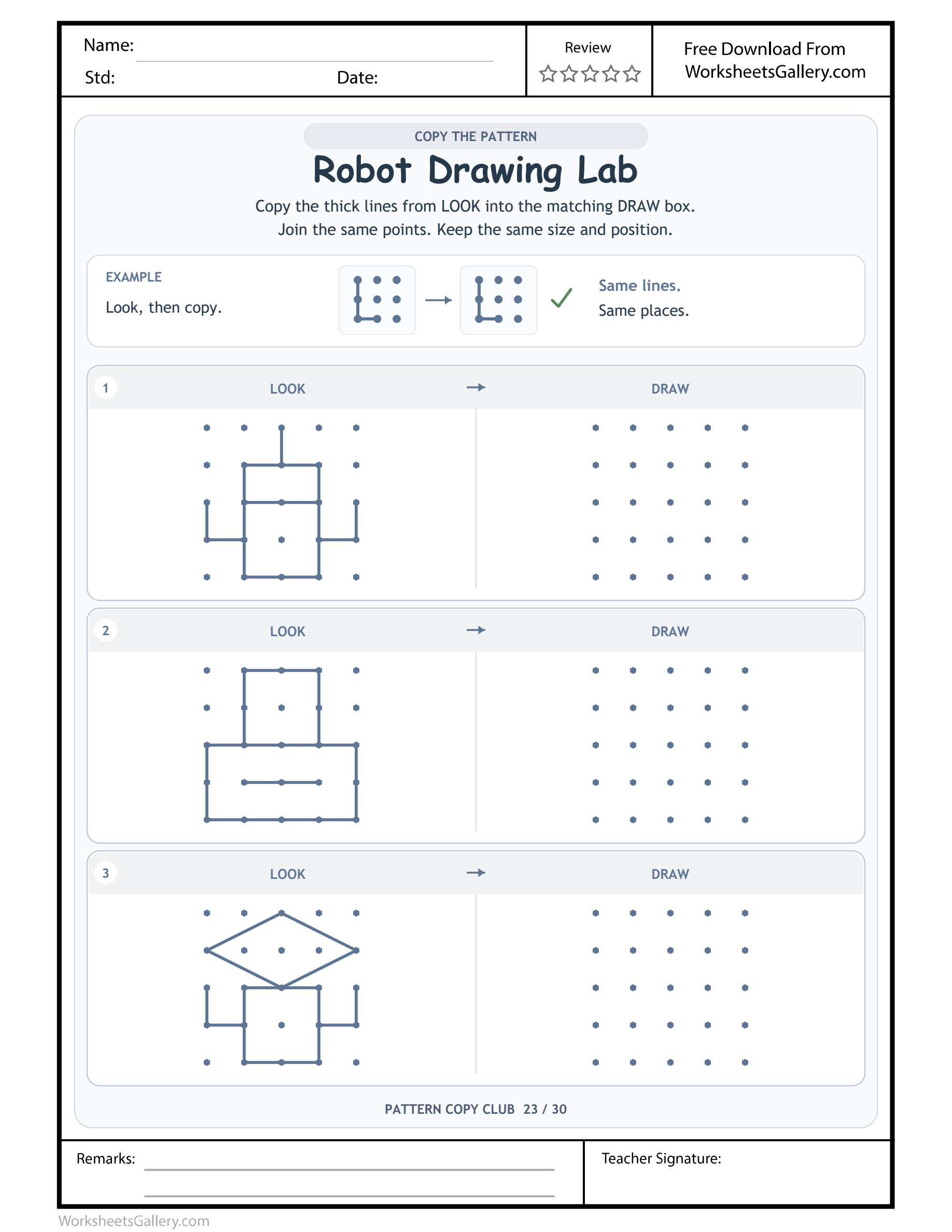
Robot Picture Copying: Copy three different robot head-and-body arrangements without filling in extra facial details.
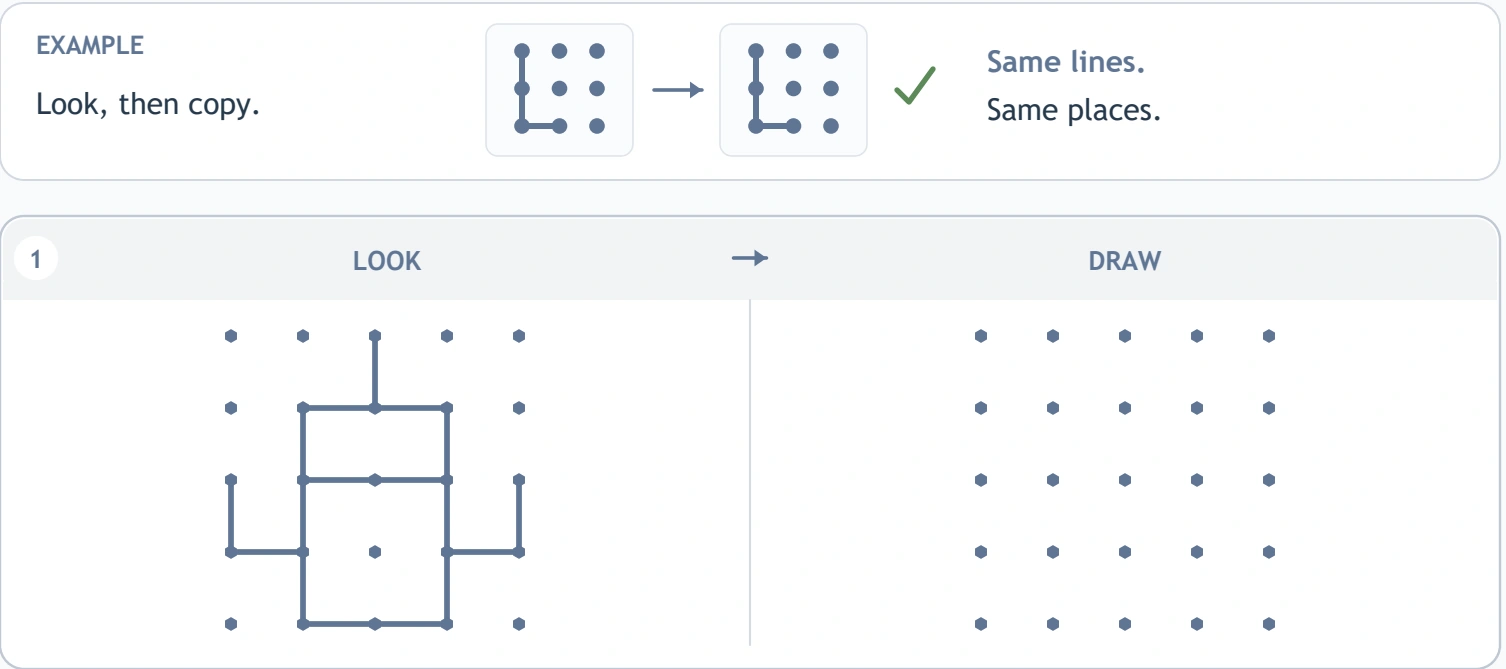
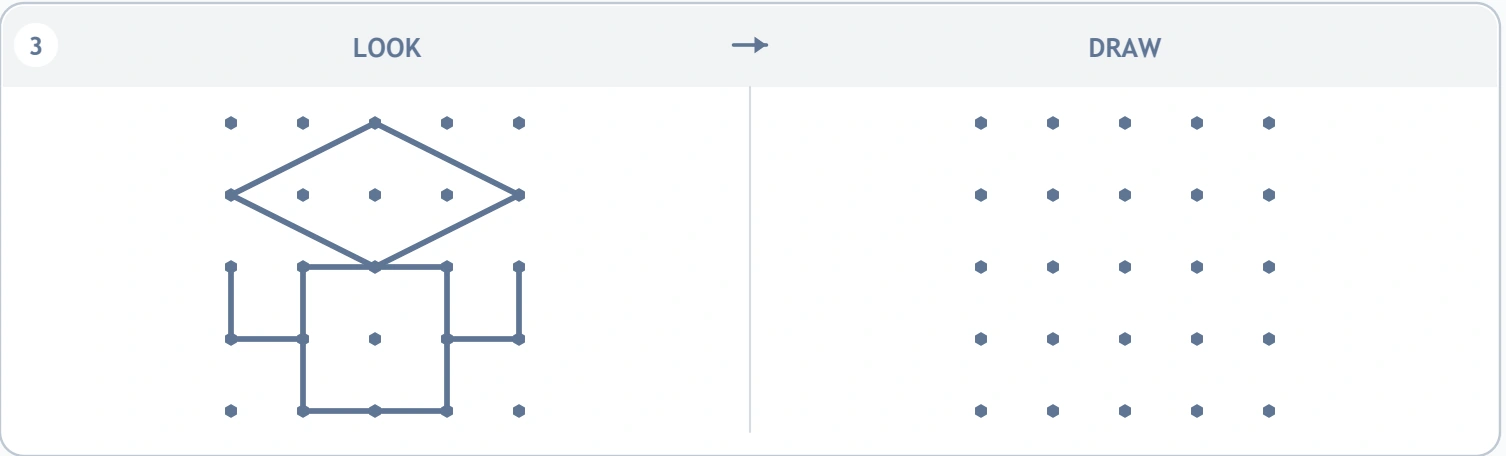
Mechanical friends arrive here as arrangements of straight lines. Robot Picture Copying gives children three robot models to reproduce on paired twenty-five-point fields. Their heads, bodies and arm positions differ, inviting learners to inspect a particular machine instead of drawing a standard robot symbol. The Robot Drawing Lab source includes a completed copying example and separate practice spaces. Choose this page when a child is interested in character pictures and can compare a few related parts at a time, using the visible reference to decide where each corner or connection should belong.
Inspect the robot before inventing its personality — Robot Picture Copying
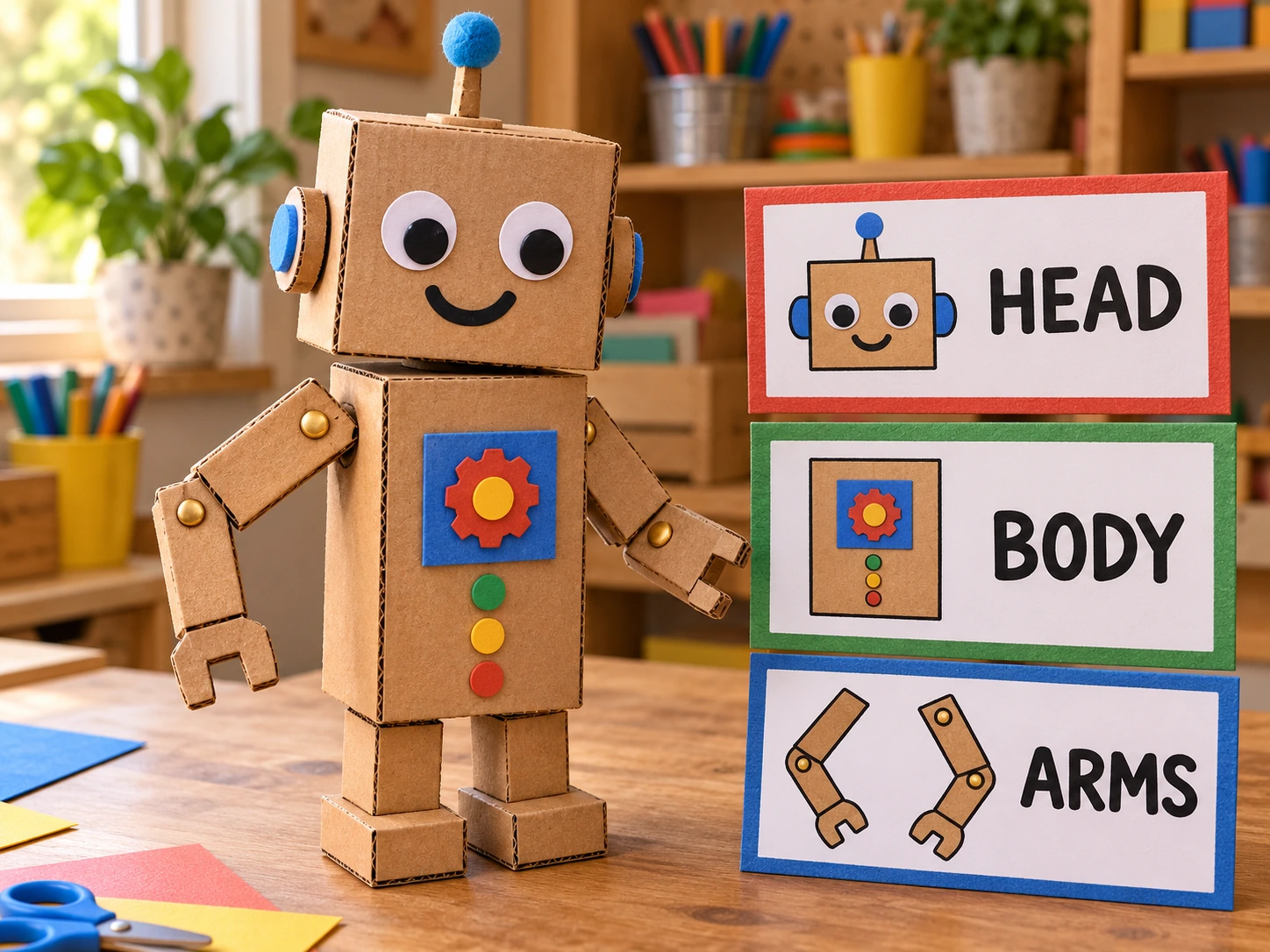
A child may immediately imagine a robot's voice or special job. That can make Robot Picture Copying engaging, but it does not determine the copied lines. The worksheet models supply geometric heads, bodies and limbs without inviting extra faces, buttons or tools in the answer field.
Give the character a story aloud while keeping its drawn parts reference-based. An invented robot design on spare paper can welcome every new feature. Here, the interesting comparison is how one printed head sits above its particular body and how the arms connect around them.
Three machines with different construction plans: Robot Picture Copying
| Robot Picture Copying pair | Visible Robot Drawing Lab model | Model structure |
|---|---|---|
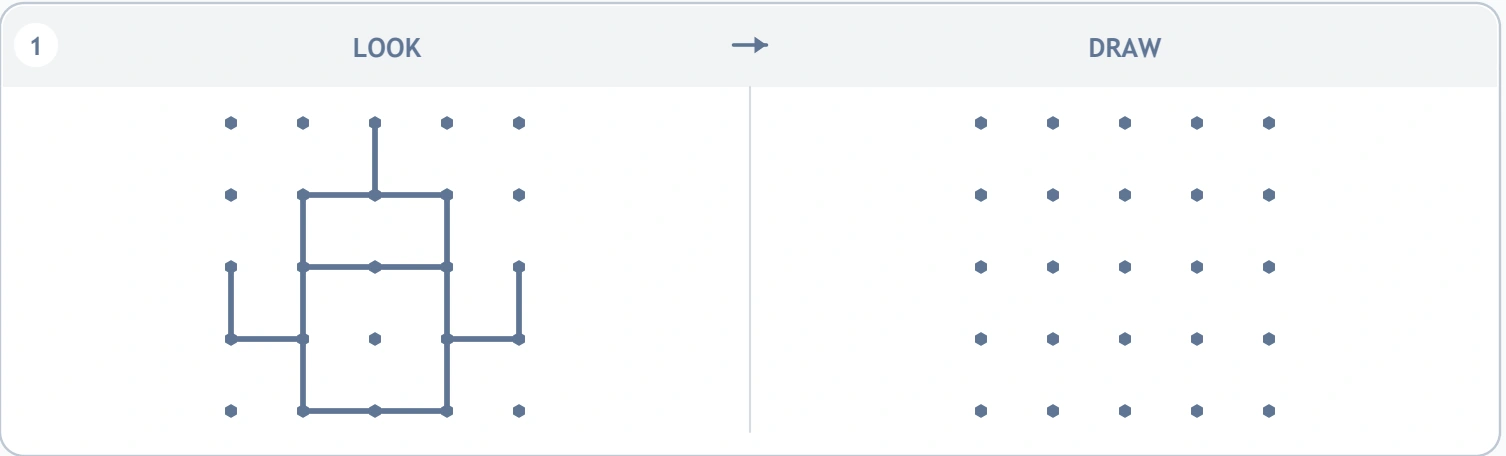
| 1 | Square-headed robot with raised outer hands | 25 anchors / 17 bold pieces in Robot Drawing Lab |
| 2 | Broad body beneath a narrow head | 25 anchors / 20 bold pieces in Robot Drawing Lab |
| 3 | Diamond-headed robot with a low rectangular body | 25 anchors / 16 bold pieces in Robot Drawing Lab |
The Robot Picture Copying segment totals count bold source pieces, sometimes divided along one straight edge. They are descriptive information, not a demand to lift the pencil that many times. Every practice field has twenty-five anchors; the learner selects those needed by the chosen robot rather than joining the entire field.
Make the head a landmark, not a shortcut: Robot Picture Copying
Begin by comparing the head's shape and position in Robot Picture Copying. Is it square-like, narrow relative to the body, or diamond-shaped? Locate a distinctive top or side corner in DRAW, then inspect where a lower head point meets the body arrangement. Work through a short group before continuing.
A familiar word such as head helps organise the picture, but it cannot replace endpoint checking. Two recognisable robot heads may occupy different spans. Keep LOOK in view and ask the child to show one connection they are about to transfer, especially after a pencil lift or a pause for conversation.
Willa's imaginary repair appointment: Robot Picture Copying
Imagine Willa bringing a toy machine to a home repair desk. An adult lays out Robot Picture Copying, and Willa chooses the robot with a diamond head. Together they build a broad version from straight strips. Willa initially adds a favourite smiling mouth, then notices the printed reference has no such line.
This invented exchange shows how to value imagination while explaining a copying goal. The smile can belong to Willa's original machine drawing on another surface. On Robot Picture Copying, Willa chooses to inspect one head edge instead. That single comparison can be enough before returning to a longer repair-shop story.
Six things an adult can notice in the workshop: Robot Picture Copying
- Part comparison. Head and body proportions are considered together rather than as unrelated shapes.
- Anchor selection. A chosen corner is matched to a specific position among twenty-five nearby markers.
- Component planning. Arms, head and torso become manageable groups within a larger picture.
- Controlled line work. Short corners and longer slants call for purposeful starts, stops and changes of direction.
- Visual inhibition. Children can leave out an appealing extra feature when the supplied model does not contain it.
- Descriptive vocabulary. Wider body, raised hand and diamond head provide language for explaining actual differences.
These experiences in Robot Picture Copying are possibilities, not promised outcomes or a formal assessment. A learner may describe an arm position clearly while needing support with the small pencil movement. Separate what the child understands from how steadily their hand can express it today.
Arms deserve a second look: Robot Picture Copying
The first Robot Picture Copying machine has raised outer hand positions, while the other models organise limbs around different body shapes. Children may default to two equal arms extending from a familiar spot. Compare the chosen robot's actual connection and endpoint before drawing that expected arrangement.
Ask whether a short piece belongs to the body's outline or to a limb beside it. Follow it with a finger, then identify its counterpart. There is no compulsory stroke route across the whole robot. Lifting the pencil can help preserve separate components and avoid inventing a connecting line through an open space.
A classroom workshop with individual plans: Robot Picture Copying
In a hypothetical classroom use of Robot Picture Copying, a teacher invites pupils to describe which robot has the broadest body or a distinctive head. Learners keep their own printed models available. The adult demonstrates comparing one part on a larger spare grid, then each child chooses a small section to attempt.
An observation might record that a pupil checked an arm endpoint before joining it. This imagined lesson does not require equal amounts of work from every learner. A carefully inspected part provides a useful conversation even when another child is ready to combine several sections. Avoid treating speed as the workshop's success measure.
Check comfort before asking for a complete machine: Robot Picture Copying
Children roughly four to seven may explore Robot Picture Copying with support during later preschool or early school work. The detailed models and twenty-five-point fields make this more demanding than copying a few simple corners. Try a head edge or body corner first and notice whether the child can locate its matching anchor.
If crowded markers are discouraging, build the same broad relationship using blocks or strips. Pointing and speaking can come before a paper attempt. Return to Robot Picture Copying when a short section feels approachable. The robot theme may attract a learner, but interest alone does not mean that three detailed copies are a comfortable sitting.
Four robot-lab extensions that change the scale: Robot Picture Copying
Issue a parts catalogue: Robot Picture Copying
Arrange broad head, body and arm constructions on a table. A child describes a particular combination for a partner to recreate while looking at it. Compare the relative widths and connection places. Relate that discussion to Robot Picture Copying's varied machines without making more tiny pencil marks.
Hold a silent robot inspection
Build two large models differing in one arm position. Invite a child to point to the difference before explaining it aloud if they wish. Swap roles. This gives gesture a legitimate place alongside language and keeps the task about visible comparison.
Invent a helper's new attachment: Robot Picture Copying
On spare paper, design an original robot tool for an imagined job. Discuss where it connects and why. Explain that this activity invites additions, while Robot Picture Copying asks for the exact supplied construction. Valuing both purposes prevents the copying task from becoming a general rule against creative detail.
Repair an altered head-body joint: Robot Picture Copying
An adult makes a large copy but joins the head at a different height. A partner identifies the changed relationship and proposes a repair. Keep the original in view and the tone friendly. The child can become the person who creates the next deliberate change for someone else to inspect.
When the robot looks right but a connection has moved: Robot Picture Copying
Common Robot Picture Copying mismatches include replacing a diamond head with a square, equalising unlike body widths, moving both arms to one level or adding eyes and buttons. Choose a single changed part and compare its endpoint positions. A specific question about the head's side corner is easier to act on than a request for a better robot.
The reference is a parts plan, not a suggestion to decorate. If the child wants a more expressive character, provide an open drawing space alongside the copy. When erasing becomes tiring, use a strip model to discuss the repair. Do not insist that every small line be retraced until the field becomes too crowded to inspect.
Return to a job the learner selected: Robot Picture Copying
The machines in Robot Picture Copying can prompt lively stories about helpful inventions. Let the child choose one clear drawing job, such as locating a raised hand or checking the narrow head. That choice can make a detailed page feel like a sequence of manageable investigations.
Offer feedback such as “You compared the head before starting its lower edge.” Plan another brief visit among building, roleplay and free sketching rather than asking for repeated full-page completion. A comfortable stopping point preserves interest. The next session can begin with the learner explaining a detail they already understand, then selecting a new part to inspect.
Download and print the model you intend to use: Robot Picture Copying
The free Robot Drawing Lab PDF preserves the supplied original. The separate clean Robot Picture Copying file is provided through the premium download when the signed-in account has an eligible membership in active status. Website watermark, domain branding and promotional ads are absent from that edition, while the complete activities and student fields remain.
For the whole set, the native package card leads to the thirty-sheet collection at a separate price of $3. Save the PDF permitted by your account and check its print preview. Use US Letter with Actual Size or a 100% scale setting. Keeping Robot Picture Copying's original dimensions preserves the small head, arm and body anchor spacing.
Related drawing work and adult activity ideas: Robot Picture Copying
Compare Robot Picture Copying with Drawing Size Choices. After Robot Drawing Lab, try Shape Border Journeys. For Robot Drawing Lab, consider Path Copy Thinking.
Adults building on Robot Picture Copying can explore learning and play suggestions at PBS Parents or family play articles from NAEYC. These independent education links are optional resources, imply no endorsement and do not add worksheets or answer files to this download.
Popular Worksheets
Printable resources families and teachers are downloading now.
 Free
 Free
 Free
 Free